使用OpenSSL制作自定义CA、自签名SSL证书

0. 前言

0.1. SSL 基础

SSL 证书是保证网站安全的重要手段之一,在数学方面,SSL 证书的破解是相当困难的。有关 SSL 原理这里不过多介绍了。

0.2. PKI 系统

PKI(Public Key Infrastructure,公钥基础设施)是一种基于公钥加密技术的安全体系结构,用于确保数据在传输过程中的安全性。PKI 体系结构包括证书颁发机构(CA)、注册机构(RA)、证书吊销列表(CRL)和证书库等组成部分。

这篇文章主要内容是使用 OpenSSL 工具制作自定义 CA 和自签名 SSL 证书。

1. 生成自定义 CA

1.1. 生成 CA 私钥

1
openssl genrsa -out ca.key 2048

其中:

  • genrsa 表示生成 RSA 私钥
  • -out ca.key 表示输出文件为 ca.key
  • 2048 表示密钥长度为 2048 位

注:RSA 在密码学角度来说,包括公钥 PK 和私钥 SK。这部分虽然说生成 CA 私钥,但事实上这个文件中包含了公钥和私钥。因为从网络安全/使用 SSL 证书的角度来说,我们经常遇到的就只有两种文件:一种是公钥,一种是公钥与私钥的组合文件,因此以下文章对于公钥与私钥的组合文件都称之为私钥。

1.2. 生成 CA 证书

由于 CA 证书是根证书,没有上级证书了,所以都是使用自己的私钥给自己签名的,因此命令为:

1
openssl req -new -x509 -days 3650 -key ca.key -out ca.crt

其中

  • -new 表示生成新的证书请求
  • -x509 表示生成 x509 证书
  • -days 3650 表示证书有效期为 10 年
  • -key ca.key 表示使用 ca.key 作为私钥
  • -out ca.crt 表示输出文件为 ca.crt

此时会让你填入一些信息

1
2
3
4
5
6
7
8
9
10
11
12
13
14
You are about to be asked to enter information that will be incorporated
into your certificate request.
What you are about to enter is what is called a Distinguished Name or a DN.
There are quite a few fields but you can leave some blank
For some fields there will be a default value,
If you enter '.', the field will be left blank.
-----
Country Name (2 letter code) [AU]:
State or Province Name (full name) [Some-State]:
Locality Name (eg, city) []:
Organization Name (eg, company) [Internet Widgits Pty Ltd]:
Organizational Unit Name (eg, section) []:
Common Name (e.g. server FQDN or YOUR name) []:
Email Address []:

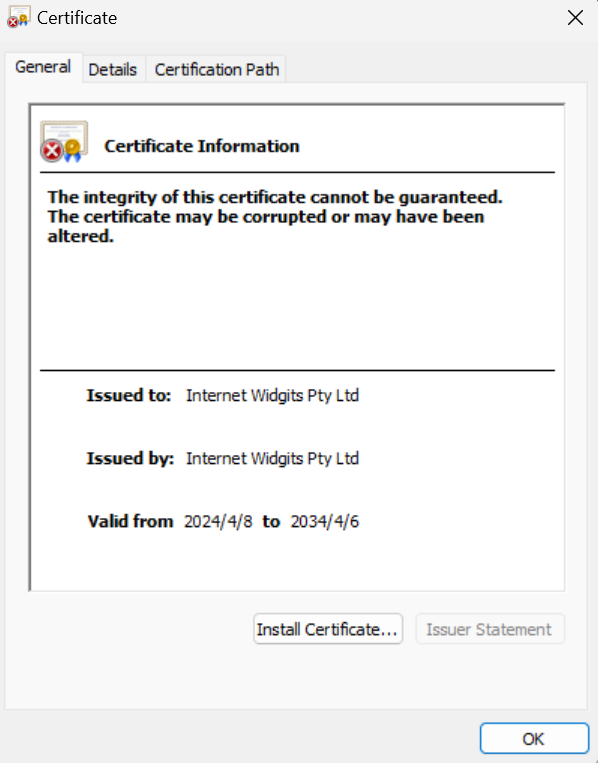
填入后,会生成一个 ca.crt 文件,这个文件就是我们的 CA 证书。

生成的CA证书在Windows中识别

这样我们就构造好了一个自定义的 CA。

2. 生成一个证书请求并使用 CA 签名

2.1. 生成私钥

想要生成一个签名的 SSL 证书,我们首先需要需要一个私钥,这个私钥是用来生成证书请求的。(不然我们给谁签名!)

1
openssl genrsa -out localhost.key 2048

此时会在这个目录里生成一个 localhost.key 文件。

2.2. 生成证书请求

1
openssl req -new -key localhost.key -out localhost.csr

其中

  • req 代表请求
  • -new 表示生成新的证书请求
  • -key localhost.key 表示使用 localhost.key 作为私钥
  • -out localhost.csr 表示输出文件为 localhost.csr

此时会让你填入一些信息,如果你要为一个域名签发,那么 Common Name 就是这个域名,例如example.com

1
2
3
4
5
6
7
8
9
10
11
12
13
14
15
16
17
18
19
You are about to be asked to enter information that will be incorporated
into your certificate request.
What you are about to enter is what is called a Distinguished Name or a DN.
There are quite a few fields but you can leave some blank
For some fields there will be a default value,
If you enter '.', the field will be left blank.
-----
Country Name (2 letter code) [AU]:
State or Province Name (full name) [Some-State]:
Locality Name (eg, city) []:
Organization Name (eg, company) [Internet Widgits Pty Ltd]:
Organizational Unit Name (eg, section) []:
Common Name (e.g. server FQDN or YOUR name) []:example.com
Email Address []:

Please enter the following 'extra' attributes
to be sent with your certificate request
A challenge password []:
An optional company name []:

填入后,会生成一个 localhost.csr 文件,这个文件就是我们的证书请求。

2.3. 使用 CA 签名

有了请求,我们就可以使用 CA 证书批准这个请求,生成一个签名的证书了,如果你在为一个域名签发证书,请将这个部分看完。
1
openssl x509 -req -days 3650 -in localhost.csr -CA ca.crt -CAkey ca.key -CAcreateserial -out localhost.crt

其中

  • x509 代表 x509 证书
  • -req 代表处理请求
  • -days 3650 代表证书有效期为 10 年
  • -in localhost.csr 代表输入文件为 localhost.csr
  • -CA ca.crt 代表使用 ca.crt 作为 CA 证书
  • -CAkey ca.key 代表使用 ca.key 作为 CA 私钥
  • -CAcreateserial 代表生成序列号
  • -out localhost.crt 代表输出文件为 localhost.crt

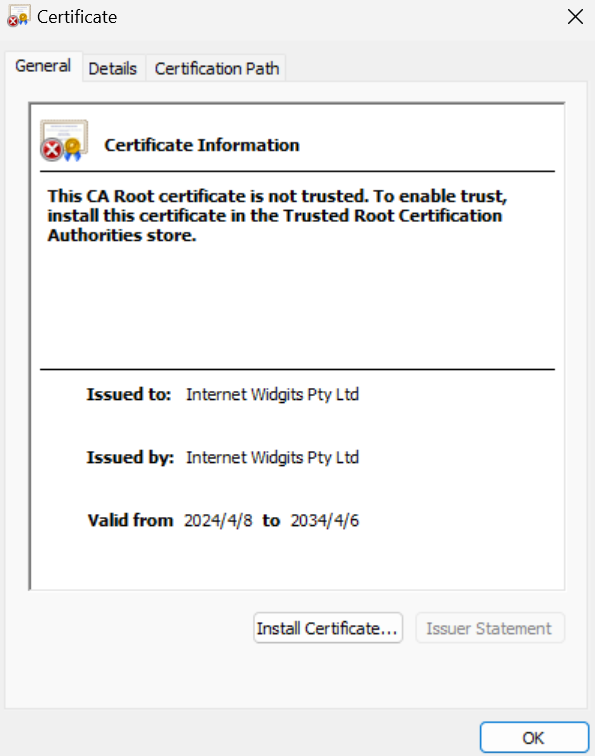
此时会生成一个 localhost.crt 文件,这个文件就是我们的签名证书。

这个证书会有以下内容

生成的证书在Windows中识别

如果你为一个域名签发证书,由于浏览器对校验证书比较严格,需添加额外配置

你需要先创建一个配置文件,例如 localhost.cnf,内容如下,记得将 example.com 替换为你的域名。

1
2
3
4
5
6
7
authorityKeyIdentifier=keyid,issuer
basicConstraints=CA:FALSE
keyUsage = digitalSignature, nonRepudiation, keyEncipherment, dataEncipherment
subjectAltName = @alt_names

[alt_names]
DNS.1 = example.com

然后使用以下命令生成证书

1
openssl x509 -req -days 3650 -in localhost.csr -CA ca.crt -CAkey ca.key -CAcreateserial -out localhost.crt -extfile localhost.cnf

3. 使用证书

如果设置了网站,那么你可以信任 CA 证书,然后将自签名证书放到网站上,这样就可以使用 HTTPS 了。

4. 参考


使用OpenSSL制作自定义CA、自签名SSL证书
https://nacldragon.top/2024/Self-Signed-Certificates/
作者
NaCl
发布于
2024年4月8日
许可协议